
 Español
  عربى
عربى 
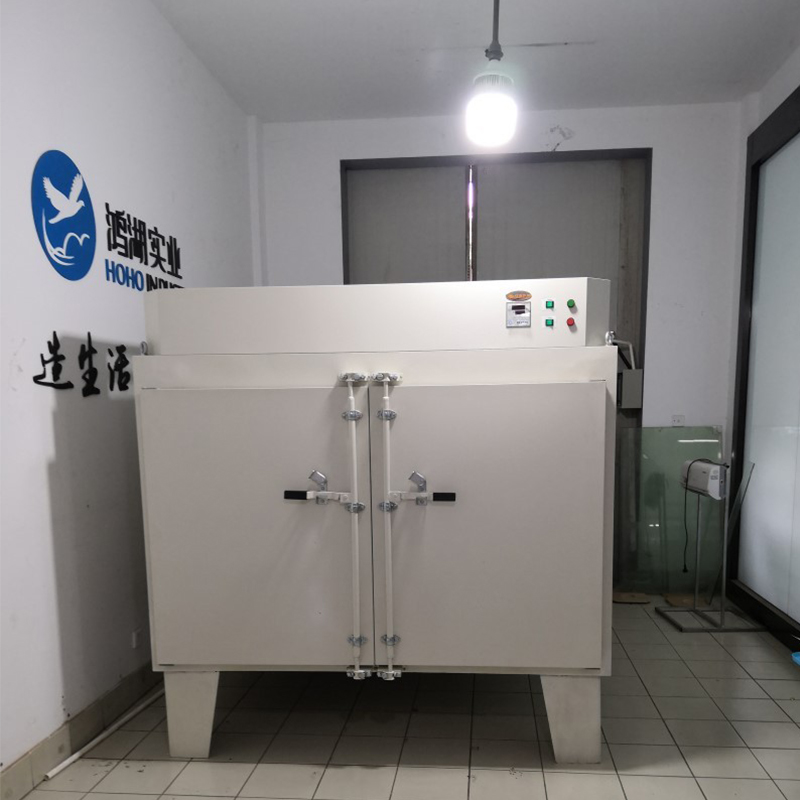
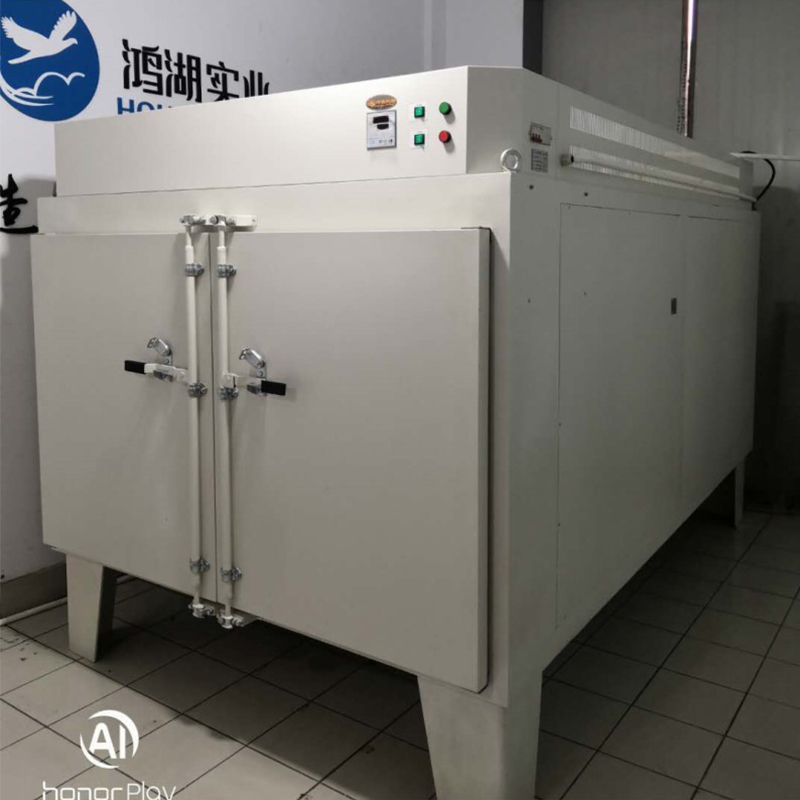
| Product Name | Customisable Colour-Changing Glass Film Oven |
| Product Model | LH-5100-150A |
| Key Specifications | Inner chamber dimensions: 1700mm (width) × 3000mm (depth) × 1000mm (height) |
| Temperature Control System | External dimensions: Customisable to requirements |
| Heating Element | Volume: 5.1m³ |
| Temperature Sensor | Temperature range: RT+20 to 120°C |
| Inner Chamber Material | Continuous operating temperature: 90°C |
| Cabinet Structure | Temperature Stability: ±1℃ |
| Outer Shell | Temperature Uniformity: ±5℃ |
| Safety Protection | Temperature Timing Range: 1-999min |
| Warranty Period | Shelves: 6 layers |
| Standard Configuration | Shelf Installation Method: Guide rail pull-out type |
| Optional Accessories | Power Supply: AC380V, 30KW, 50HZ" |
Colour-Changing Glass Film Oven User Manual
I. Scope of Application
This equipment is suitable for drying and conducting various constant-temperature adaptation tests on diverse products or materials, including electrical appliances, instruments, gauges, components, electronics, electrical equipment, automotive parts, aerospace components, communications equipment, plastics, machinery, chemicals, foodstuffs, chemical products, and hardware tools under constant-temperature environmental conditions.
Key Technical Parameters
Temperature Range: RT+20 to 120°C
Continuous Operating Temperature: 90℃
Temperature Stability: ±1℃
Temperature Uniformity: ±5℃
Timer Range: 1–999 minutes
Shelves: 6 units (aluminium honeycomb panels, seamless construction)
Power Rating: 9000W
Power Supply: 380V/50Hz
III. Product Structural Features
The cabinet employs high-quality cold-rolled steel plate with electrostatic powder coating. The coating is hard, durable, and offers exceptional rust resistance.
The working chamber is constructed from premium stainless steel plate, featuring rounded corners for a smooth, streamlined finish that facilitates effortless cleaning.
The space between the cabinet and working chamber is filled with ultra-fine glass wool insulation material, providing excellent thermal retention. This effectively ensures stable and accurate internal temperatures while minimising impact on the surrounding environment.
A rational hot-air circulation channel is integrated within the chamber, promoting uniform temperature distribution and accelerated heating. An exhaust duct facilitates the controlled venting of air from the chamber. Should the discharged air carry odours or toxic substances, the duct can be easily connected to external pipework for directed venting to a designated location.
Temperature regulation employs microprocessor-based intelligent digital technology, featuring industrial PID self-tuning and a four-digit dual LED display. This ensures high control precision, exceptional interference resistance, and user-friendly operation (refer to the controller manual for details).
IV. Installation and Commissioning
1. During transport, avoid applying force to the glass surfaces and prevent impacts to the chamber body.
2. After placing the unit on the floor, ensure it is level. Adjust the base if the surface is uneven.
3. Do not operate the instrument in direct sunlight or in high-temperature, humid environments.
4. Position the unit away from sources of electromagnetic interference and ensure the equipment's earth wire is effectively grounded.
5. During normal operation, arrange items inside the chamber so they do not obstruct airflow, ensuring uniform temperature distribution.
6. The power supply is AC 380V 50Hz. A four-pin socket rated at 25A or above with a reliable earth connection must be used. Do not use a three-pin socket without modification. The power supply is AC 380V 50Hz and requires a three-phase power socket with a reliable earth connection.
7. Do not position the power cable close to the rear of the unit, nor allow the instrument or other objects to press upon the power cable, to prevent damage.
V. Product Operating Instructions
1. Open the chamber door and place items to be processed onto the internal shelves (avoid overcrowding to permit adequate air circulation within the chamber). Close the door.
2. Connect the power supply by inserting the plug into a 380V socket. Set the power switch on the right side of the control panel to the ‘ON’ position. The digital display will illuminate, indicating the equipment is operational.
3. Set the desired chamber temperature using the temperature controller on the control panel.
4. The instrument commences operation, gradually reaching the set temperature. Once the required drying duration is complete, the process concludes.
5. Switch off the power supply. Allow the chamber temperature to approach ambient conditions before opening the door and removing items.
【!】Caution: Exercise care when opening the door to retrieve items, as residual heat may cause burns. Flammable or explosive materials must not be placed inside the drying oven.
Special Notes
⑴ Products undergo rigorous testing prior to dispatch. Calibration is generally unnecessary. However, if used in harsh environments or at temperatures exceeding the recommended range, discrepancies may arise between the displayed temperature and the actual chamber temperature. Should deviations exceed technical specifications, refer to the temperature controller's operating instructions for necessary adjustments.
⑵ During normal operation, if the chamber door remains open for an extended period, temporary temperature fluctuations may occur upon closing the door. This is a normal phenomenon.
◆ Panel Functions
Indicator Light Definitions
1. ‘RUN/AT’ Indicator Light: Illuminates during operation and extinguishes upon completion; flashes during self-tuning.
2. ‘OUT’ Indicator: Illuminates when heating output is active; extinguished otherwise.
3. ‘ALM’ Indicator: Illuminates during over-temperature alarm; extinguished otherwise.
VI. Operation and Usage Methods
1. Upon powering the controller, the upper display row shows ‘InP’ and the lower row displays the ‘range value’ for approximately 3 seconds before entering normal display mode.
2. Reference and Setting of Temperature and Constant Temperature Duration
Press the ‘Set’ key to enter temperature setting mode. The lower row of the display shows the prompt ‘SP’, while the upper row displays the temperature setpoint (with the units digit flashing initially). Adjust the desired setpoint using the shift, increment, and decrement keys. Press the ‘Set’ button again to enter the constant temperature time setting mode. The lower row of the display shows the prompt “St”, while the upper row displays the constant temperature time setting value (with the units digit flashing first). Use the shift, increment, and decrement buttons to adjust to the desired setting value. Press the ‘Set’ button once more to exit this setting mode; modified values are automatically saved.
When the constant temperature time is set to ‘0’, this indicates no timed function is active. The controller operates continuously, with the lower row of the display showing the temperature setpoint. When the set time is not ‘0’, the lower row of the display window shows the elapsed time with the last decimal place illuminated. Once the measured temperature reaches the setpoint, the timer commences counting down. The illuminated decimal point flashes. Upon time completion, operation ceases, the lower row displays “End”, and the buzzer sounds for 30 seconds. After operation ends, pressing and holding the ‘Decrease/Restart’ key for 3 seconds will restart the cycle.
3. During an over-temperature alarm, the buzzer sounds continuously and the ‘ALM’ alarm indicator illuminates. If an over-temperature alarm occurs due to altering the temperature setpoint, the ‘ALM’ indicator illuminates but the buzzer does not sound.
4. Pressing any key will silence the buzzer when it sounds.
5. ‘Shift’ key: Pressing this key in setpoint mode shifts the setpoint value for flashing modification.
6. ‘Decrease’ key: Press briefly in setting mode to decrement the value; press and hold for continuous decrement.
7. ‘Increase’ key: Press briefly in setting mode to increment the value; press and hold for continuous increment.
8. If no key is pressed within one minute during setting mode, the controller automatically returns to normal display.
9. Should the top row of the controller display show ‘----’, this indicates a fault with the temperature sensor or the controller itself. Please thoroughly inspect the temperature sensor and its wiring.
System Self-Tuning
System self-tuning may be performed when temperature control performance is unsatisfactory. Significant temperature overshoot may occur during self-tuning; users should fully consider this factor before initiating the process.
To initiate system self-tuning from non-setpoint mode, press and hold the ‘Shift/Self-Tune’ key for 6 seconds. The ‘RUN/AT’ indicator will flash. Upon completion, the indicator will cease flashing, and the controller will obtain an optimised set of system PID parameters, which are automatically saved. During self-tuning, pressing and holding the ‘Shift/Self-Tune’ key for 6 seconds will terminate the procedure.
Should an over-temperature alarm occur during self-tuning, the ‘ALM’ alarm indicator will remain unlit and the buzzer will not sound; however, the heating alarm relay will automatically disconnect. The ‘Set’ key is inactive during self-tuning. Regardless of whether a constant temperature period is set, the lower row of the controller display will always show the temperature setpoint.
Consulting and Setting Temperature Internal Parameters
Press and hold the Set key for approximately 3 seconds. The lower row of the controller display will show the password prompt ‘Lc’, while the upper row displays the password value. Use the Increase, Decrease, and Shift keys to modify the password to the desired value. Press the Set key again. If the password is incorrect, the controller automatically returns to normal display mode. If the password is correct, it enters the internal temperature parameter setting state. Pressing the Set key again allows sequential modification of each parameter. Press and hold the Set key for 3 seconds to exit this state; parameter values are automatically saved.
| Internal Parameters Table-1 | |||
| Parameter Indication | Parameter Name | Parameter Function Description | (Range) Factory setting |
| Lc- | Password | When ‘Lc=3’, parameter values may be viewed and modified. | 0 |
| AL- | Over-temperature deviation alarm | ‘When the measured temperature exceeds the setpoint plus AL, the alarm indicator illuminates, the buzzer sounds (refer to Operation and Usage Method 3.), and the heating output disconnects.’ | (0.0 to 100.0°C) 20.0 |
| T- | Control cycle | Heating control cycle. | (1 to 60 seconds) Note 1 |
| P- | Proportional band | Time proportional action adjustment. | (1.0 to full scale value) 35.0 |
| I- | Integral time | Integral action adjustment. | (1 to 1000 seconds) 200 |
| D- | Derivative time | Derivative action adjustment. | (0 to 1000 seconds) 200 |
| Pb- | Zero adjustment | Corrects errors arising from sensor measurement (low temperature). Pb = Actual temperature value - Instrument measurement value |
(-12.0 to 12.0°C) 0.0 |
| PK- | Full-scale adjustmen | Corrects errors arising from sensor measurement (high temperature). PK = 1000 × (Actual temperature value - Instrument measurement value) / Instrument measurement value |
(-999~999)0 |
| Note 1: For controllers of model PCD-2xx2 (relay output), the factory-set value for the heating control cycle is 20 seconds; for other models, it is 5 seconds. | |||
| Internal Parameters Table-2 | |||
| Internal Parameters Table-2 | Parameter Name | Parameter Function Description | (Range) Factory setting |
| Lc- | Password | When ‘Lc=9’, parameter values may be viewed and modified. | 0 |
| Co- | Heating Output Shutdown Deviation | When the measured temperature value ≥ set temperature value + Co, the heating output is switched off. |
(0.0~50.0℃)5.0 |
| Hn- | Thermostat Timing Mode | 0: Minute timer; 1: Hour timer | (0~1)0 |
| OP- | Door Control Function | 0: Disable door-opening detection function; 1: Enable door-opening detection function. Note 2 |
(0~1)1 |
| RH- | Range Value | Maximum value for the set temperature. | (0~400.0℃) 300.0 |
VII. Precautions
1. Flammable and volatile chemical substances must not be placed inside the cabinet.
2. Should any abnormalities, odours, or smoke occur during operation, immediately switch off the power supply. Users must not attempt repairs themselves; contact our company's repair department for inspection and servicing by qualified personnel. (New units may emit odours and minimal smoke upon initial start-up; this is normal. Observe for one or two cycles. If persistent, contact our customer service centre for advice).
3. Regularly wipe the inner chamber walls and equipment surfaces to maintain cleanliness and enhance glass transparency. Do not use acidic, alkaline, or other corrosive solutions to clean external surfaces.
4. When the equipment is unused for extended periods, disconnect the power cord to prevent potential hazards. Additionally, periodically (typically quarterly) operate the unit under normal conditions for 2-3 days to expel moisture from electrical components and prevent damage to related devices.
VIII. Fault Repair
| Symptoms | Principles | Procedure |
| 1. No power supply | 1. Socket lacks power supply | 1. Replace the socket |
| 2. Plug not properly inserted or broken wire | 2. Plug in the connector or reconnect the wiring | |
| 3. Fuse open circuit | 3. Replace the fuse | |
| 4. Power switch not engaged | 4. Switch on the power supply | |
| 2. Chamber temperature fails to rise | 1. Set temperature too low | 1. Adjust the set temperature |
| 2. Electric heater faulty | 2. Replace the electric heater | |
| 3. Temperature controller faulty | 3. Replace the temperature controller | |
| 4. Temperature sensor connection wire loose | 4. Tighten the sensor connection nut | |
| 3. Significant deviation between setpoint and chamber temperature | 1. Faulty temperature sensor | 1. Replace the temperature sensor |
| 2. Ambient temperature excessively high (exceeding 30°C) | 2. Operate in an air-conditioned environment | |
| 4. Temperature control failure | 1. Temperature sensor mounting detached | 1. Secure the temperature sensor |
| 2. Faulty temperature controller or thyristor | 2. Replace the temperature controller and thyristor |